> ## Documentation Index
> Fetch the complete documentation index at: https://docs.vortexiq.ai/llms.txt
> Use this file to discover all available pages before exploring further.
# Migration History in StagingPro for BigCommerce
> The Migration History tab (runs, scheduled rows, run detail, issue log) and the Code Deployments tab (approval, logs, theme rollback).
Migration History is the StagingPro audit and diagnosis surface. Every data migration and theme deployment lands here with full provenance: what entities were touched, when it ran, where data went, and the result. Theme deployments can be rolled back with one click from the **Code Deployments** tab; data migrations have no rollback — use the run detail and issue log to diagnose, and re-run with the right scope.
 ## Migration History tab
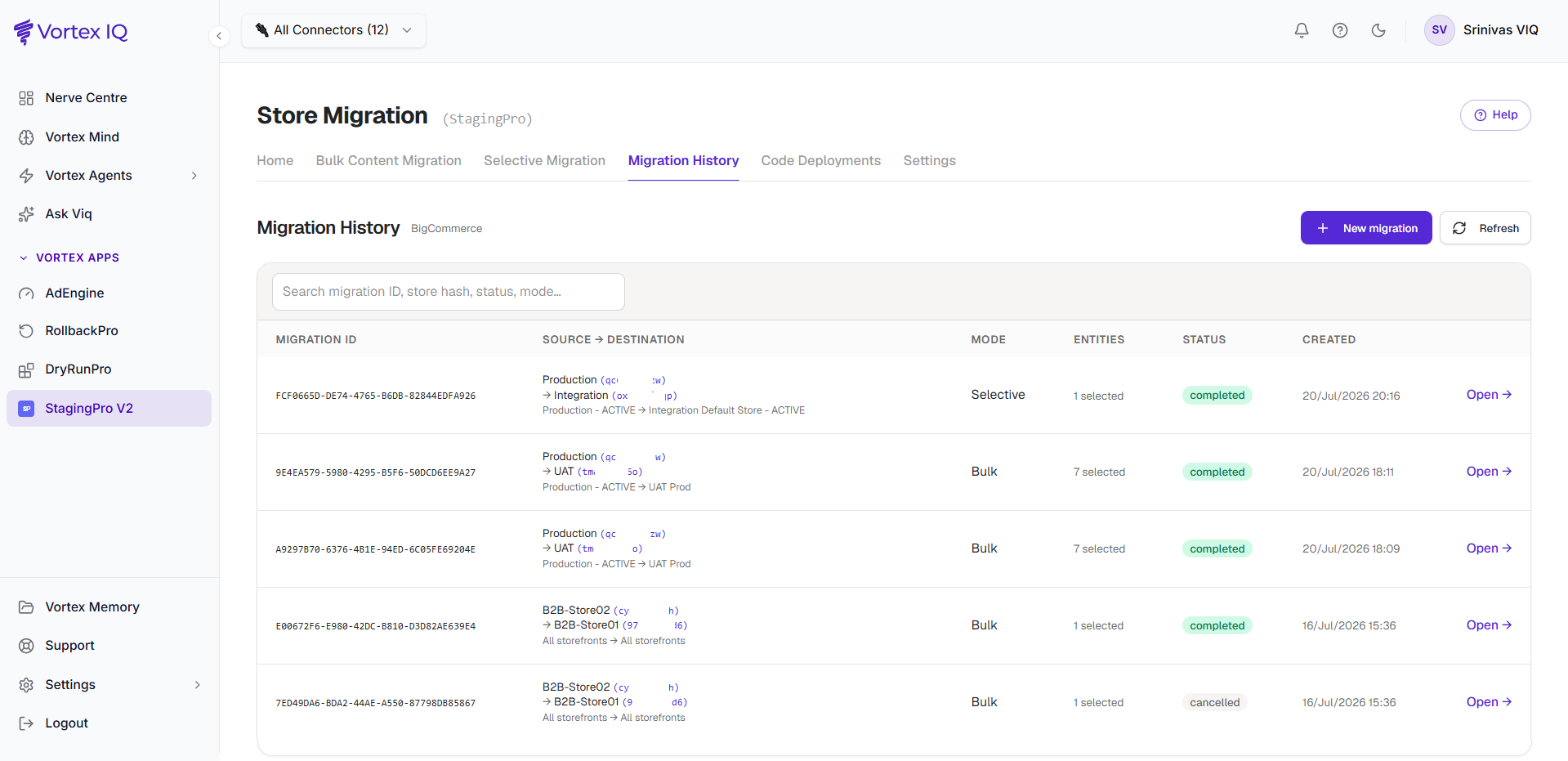
This tab lists every migration, newest first. History is **permanent** — it survives independently of the machinery that ran the migration, so a run from months ago opens with its full detail and issue log. The list is paginated (10/25/50/100 rows per page, Prev/Next; there is deliberately no jump-to-page so pages never drift or duplicate while new runs land). The search box filters the current page.
### Reading a migration row
Each row shows:
| Column | Meaning |
| ------------------------ | --------------------------------------------------------------------------------------------------------------------------------------------------------------------------------------------------------------------------------------------------------------------------------------------------------------------------------------------------------------------------------------------- |
| **Migration ID** | Unique identifier (e.g. `20FDC58D-CC9D-4586-956B-B8AECC5B2C0C`). Quote this to support if logging a ticket. A migration that was scheduled and has started has an id starting `SR-`. A schedule that has not started yet shows its state here instead: **Scheduled** with a countdown, **Waiting** with the run it is waiting for, or **Could not start** / **Missed** with who requested it. |
| **Source → Destination** | Friendly environment names (matching the Home tab) with store hashes, and the storefront pair ("All storefronts → All storefronts" when unscoped) |
| **Mode** | Bulk, Selective, or True Replica |
| **Entities** | A count of the selected entity groups (hover for the full list). A product run that left its brands or categories out shows *Brands: excluded* and/or *Categories: excluded* underneath |
| **Status** | Current state (see status meanings below) |
| **Created** | When the run was started. For a schedule that has not started yet, the time it is scheduled for, shown in the timezone it was scheduled in |
Status meanings (shown as their literal values):
| Status | Meaning |
| ------------------- | ----------------------------------------------------------------------------------------------------------------------------------------------------------------------------- |
| `queued` | Accepted, not yet started |
| `in_progress` | Currently running (a quiet progress bar usually means the destination is digesting — the engine pauses writes on purpose) |
| `paused` | Paused by an operator; resume continues from the checkpoint |
| `completed` | Finished |
| `partial_completed` | Finished with a meaningful portion incomplete |
| `failed` | Nothing (or almost nothing) reached the destination — the detail page shows a plain-language diagnosis; item-level failures on an otherwise successful run do **not** fail it |
| `cancelled` | Manually stopped before completion |
A True Replica run's detail chip additionally shows **verifying replica** after the engine finishes, while the compare/delta/report pipeline is still working.
### Scheduled migrations in the list
A migration [scheduled for later](/vortex-apps/staging-pro/scheduled-migrations) appears among the schedules at the top of the list from the moment it is saved, with **Details →** in place of **Open →**. Its status chip shows the schedule's state (**Scheduled** with a countdown, **Waiting**, **Could not start** or **Missed**); what each means, and the waiting and missed rules, are on [Scheduled migrations](/vortex-apps/staging-pro/scheduled-migrations#the-statuses-a-schedule-moves-through). **Could not start** and **Missed** rows stay for 30 days. **Details →** opens the schedule: when it starts, who requested it, its history, and **Reschedule** and **Cancel schedule** while it is still pending. A cancelled schedule leaves the list.
## Migration History tab
This tab lists every migration, newest first. History is **permanent** — it survives independently of the machinery that ran the migration, so a run from months ago opens with its full detail and issue log. The list is paginated (10/25/50/100 rows per page, Prev/Next; there is deliberately no jump-to-page so pages never drift or duplicate while new runs land). The search box filters the current page.
### Reading a migration row
Each row shows:
| Column | Meaning |
| ------------------------ | --------------------------------------------------------------------------------------------------------------------------------------------------------------------------------------------------------------------------------------------------------------------------------------------------------------------------------------------------------------------------------------------- |
| **Migration ID** | Unique identifier (e.g. `20FDC58D-CC9D-4586-956B-B8AECC5B2C0C`). Quote this to support if logging a ticket. A migration that was scheduled and has started has an id starting `SR-`. A schedule that has not started yet shows its state here instead: **Scheduled** with a countdown, **Waiting** with the run it is waiting for, or **Could not start** / **Missed** with who requested it. |
| **Source → Destination** | Friendly environment names (matching the Home tab) with store hashes, and the storefront pair ("All storefronts → All storefronts" when unscoped) |
| **Mode** | Bulk, Selective, or True Replica |
| **Entities** | A count of the selected entity groups (hover for the full list). A product run that left its brands or categories out shows *Brands: excluded* and/or *Categories: excluded* underneath |
| **Status** | Current state (see status meanings below) |
| **Created** | When the run was started. For a schedule that has not started yet, the time it is scheduled for, shown in the timezone it was scheduled in |
Status meanings (shown as their literal values):
| Status | Meaning |
| ------------------- | ----------------------------------------------------------------------------------------------------------------------------------------------------------------------------- |
| `queued` | Accepted, not yet started |
| `in_progress` | Currently running (a quiet progress bar usually means the destination is digesting — the engine pauses writes on purpose) |
| `paused` | Paused by an operator; resume continues from the checkpoint |
| `completed` | Finished |
| `partial_completed` | Finished with a meaningful portion incomplete |
| `failed` | Nothing (or almost nothing) reached the destination — the detail page shows a plain-language diagnosis; item-level failures on an otherwise successful run do **not** fail it |
| `cancelled` | Manually stopped before completion |
A True Replica run's detail chip additionally shows **verifying replica** after the engine finishes, while the compare/delta/report pipeline is still working.
### Scheduled migrations in the list
A migration [scheduled for later](/vortex-apps/staging-pro/scheduled-migrations) appears among the schedules at the top of the list from the moment it is saved, with **Details →** in place of **Open →**. Its status chip shows the schedule's state (**Scheduled** with a countdown, **Waiting**, **Could not start** or **Missed**); what each means, and the waiting and missed rules, are on [Scheduled migrations](/vortex-apps/staging-pro/scheduled-migrations#the-statuses-a-schedule-moves-through). **Could not start** and **Missed** rows stay for 30 days. **Details →** opens the schedule: when it starts, who requested it, its history, and **Reschedule** and **Cancel schedule** while it is still pending. A cancelled schedule leaves the list.
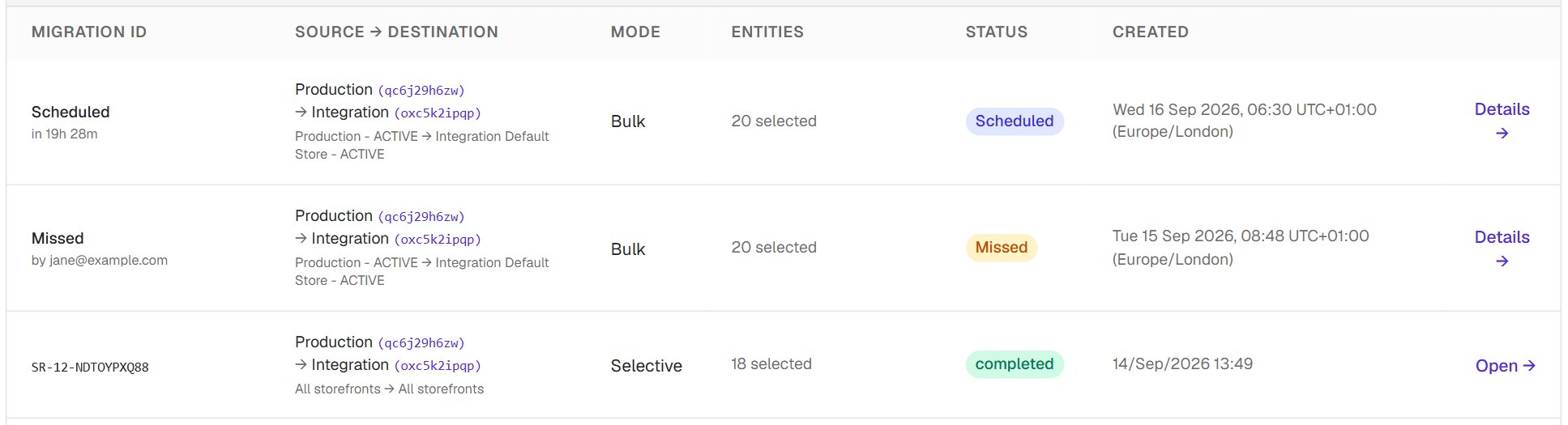 When a scheduled migration starts, its row becomes the run itself: the id (starting `SR-`) replaces the state, the status follows the run, and **Open →** opens the normal run detail; the number after `SR-` is the schedule's number. The schedule's own details popup links to the run it started.
### Drilling into run detail
Click **Open →** on any row. The run detail page shows live progress (current phase, items done, rate, and a time estimate that sharpens as the run proceeds), **Pause / Resume / Cancel** controls, a colour-coded strategy badge, timings (Started / Completed / Time taken, plus an **Attempts** counter if the run was resumed), and:
* **Choices**: run options recorded when the run was started, for example *Product visibility on destination: hidden* when [Hide products on the destination](/vortex-apps/staging-pro/selective-content-migration#products) was ticked.
* **Breakdown by Phase** — one row per entity with **Total · Created · Updated · Matched · Failed · Skipped** columns (a **Deleted** column appears only on Make Exact Copy runs). Each phase row is followed inline by its section and sub-component rows; the numbers always reconcile to the totals, and a component that ran but found nothing shows an explicit 0.
* **Issue log** — click the failed / skipped / warnings counters to open it. Items are grouped into **Fixed automatically** (items auto-heal repaired, with how), **Failed**, **Warnings**, and **Skipped**, each named (SKU, file, key, or name) with a plain-English reason and a "what to do" action. Repeating warnings are folded (examples plus a "+N more" totals line). **Export CSV** downloads the lot.
* **Theme activation** — per picked theme, green ✓ / amber ✗ chips per targeted storefront; hover a chip for the reason, and the amber chip links into the issue log. Activation is confirmed by reading the storefront back, not just by API success.
* **Page templates** — the picked template files and whether global widget content was included and migrated.
**Just finished?** Right after a run completes, its store names, timings, Breakdown by Phase and issue log can take up to a minute to appear while the final report is being stored. If the detail of a run that finished moments ago looks empty, wait a moment and open it again.
A non-zero skipped count isn't automatically a problem — many skips are deliberate (for example, references pointing at items outside the migration). The message says when no action is needed.
## Code Deployments tab
The Code Deployment tab tracks theme deployments from the connected repository:
When a scheduled migration starts, its row becomes the run itself: the id (starting `SR-`) replaces the state, the status follows the run, and **Open →** opens the normal run detail; the number after `SR-` is the schedule's number. The schedule's own details popup links to the run it started.
### Drilling into run detail
Click **Open →** on any row. The run detail page shows live progress (current phase, items done, rate, and a time estimate that sharpens as the run proceeds), **Pause / Resume / Cancel** controls, a colour-coded strategy badge, timings (Started / Completed / Time taken, plus an **Attempts** counter if the run was resumed), and:
* **Choices**: run options recorded when the run was started, for example *Product visibility on destination: hidden* when [Hide products on the destination](/vortex-apps/staging-pro/selective-content-migration#products) was ticked.
* **Breakdown by Phase** — one row per entity with **Total · Created · Updated · Matched · Failed · Skipped** columns (a **Deleted** column appears only on Make Exact Copy runs). Each phase row is followed inline by its section and sub-component rows; the numbers always reconcile to the totals, and a component that ran but found nothing shows an explicit 0.
* **Issue log** — click the failed / skipped / warnings counters to open it. Items are grouped into **Fixed automatically** (items auto-heal repaired, with how), **Failed**, **Warnings**, and **Skipped**, each named (SKU, file, key, or name) with a plain-English reason and a "what to do" action. Repeating warnings are folded (examples plus a "+N more" totals line). **Export CSV** downloads the lot.
* **Theme activation** — per picked theme, green ✓ / amber ✗ chips per targeted storefront; hover a chip for the reason, and the amber chip links into the issue log. Activation is confirmed by reading the storefront back, not just by API success.
* **Page templates** — the picked template files and whether global widget content was included and migrated.
**Just finished?** Right after a run completes, its store names, timings, Breakdown by Phase and issue log can take up to a minute to appear while the final report is being stored. If the detail of a run that finished moments ago looks empty, wait a moment and open it again.
A non-zero skipped count isn't automatically a problem — many skips are deliberate (for example, references pointing at items outside the migration). The message says when no action is needed.
## Code Deployments tab
The Code Deployment tab tracks theme deployments from the connected repository:
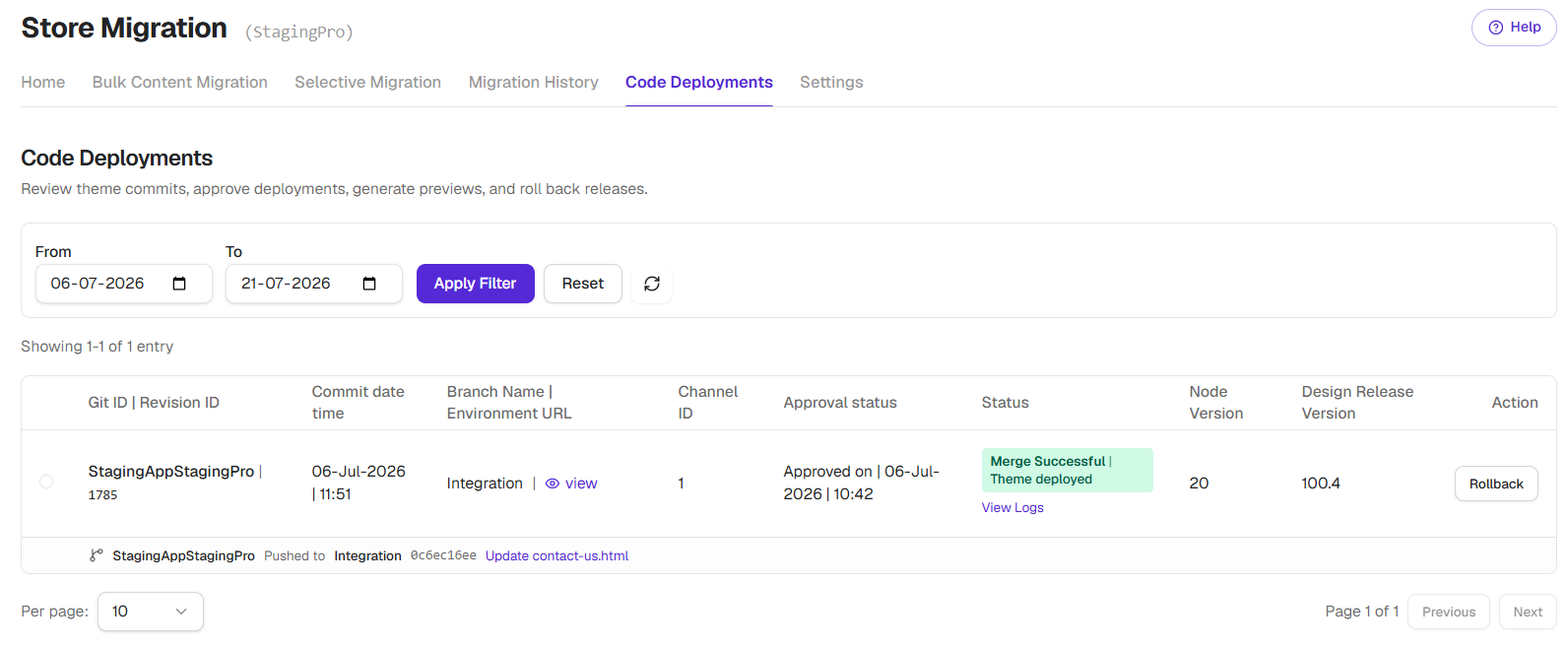 Each row:
| Column | Meaning |
| --------------------------------- | ------------------------------------- |
| **Git ID / Revision ID** | Reference to the code commit |
| **Commit date time** | When the code was committed |
| **Branch Name / Environment URL** | Which branch and where it deployed |
| **Channel ID** | The BigCommerce channel targeted |
| **Approval status** | Whether the deployment was approved |
| **Status** | Deployment state |
| **Design Release Version** | Theme version number |
| **Action** | Deploy, View Logs, Rollback, Schedule |
### Approval workflow
Code deployments may require approval before going live:
* **Pending Approval**, deployment is waiting for review.
* **Approved**, deployment will proceed.
* **Rejected**, deployment will not run.
Available actions depending on state:
* **Deploy**, push the theme to the target environment.
* **View Logs**, inspect detailed deployment logs.
* **Rollback**, revert to a previous theme version.
* **Schedule**, set a future deployment time.
Deployments may take 15 to 20 minutes after approval, depending on theme size. The bottleneck is BigCommerce assembling the theme bundle and accepting the upload, not StagingPro itself.
### Theme Rollback
The Action column on Code Deployment offers Rollback. Click it, and StagingPro redeploys the previous theme version to the same environment.
Allow 15 to 20 minutes for the rollback bundle to land on BigCommerce. Useful when a theme deploy regressed checkout or broke a key page.
## Audit trail summary
The Migration History section gives you a complete audit trail:
* **Who**, control actions (pause, resume, cancel) are attributed to the account that performed them; runs themselves are recorded against your organisation.
* **What**, exactly which entities were migrated.
* **When**, precise timestamps for every activity.
* **Where**, source and destination environments.
* **Result**, success, partial, or failure with error details.
**Useful for** compliance reporting, post-incident review, change management, team coordination, troubleshooting handoffs to support.
## Best practices
| Practice | Why |
| --------------------------------------------------------------------- | --------------------------------------------------------------- |
| Check the Migration History tab after every migration. | Detect issues early while they're easier to investigate. |
| Review failed items as soon as possible. | Distinguish temporary failures from issues that require action. |
| Include Migration IDs in all team communications and support tickets. | Expedites troubleshooting and support. |
| Record any manual changes made outside the migration. | Preserves a complete audit trail. |
| Do not rename auto-generated github branches. | Ensures accurate commit tracking. |
### Before contacting support
Please gather the following information and send, to enable our team in resolving the issue quickly:
* Migration ID of the problematic migration.
* Started at and Completed at timestamps.
* Error messages from the per-entity view.
* Source and destination environments.
Each row:
| Column | Meaning |
| --------------------------------- | ------------------------------------- |
| **Git ID / Revision ID** | Reference to the code commit |
| **Commit date time** | When the code was committed |
| **Branch Name / Environment URL** | Which branch and where it deployed |
| **Channel ID** | The BigCommerce channel targeted |
| **Approval status** | Whether the deployment was approved |
| **Status** | Deployment state |
| **Design Release Version** | Theme version number |
| **Action** | Deploy, View Logs, Rollback, Schedule |
### Approval workflow
Code deployments may require approval before going live:
* **Pending Approval**, deployment is waiting for review.
* **Approved**, deployment will proceed.
* **Rejected**, deployment will not run.
Available actions depending on state:
* **Deploy**, push the theme to the target environment.
* **View Logs**, inspect detailed deployment logs.
* **Rollback**, revert to a previous theme version.
* **Schedule**, set a future deployment time.
Deployments may take 15 to 20 minutes after approval, depending on theme size. The bottleneck is BigCommerce assembling the theme bundle and accepting the upload, not StagingPro itself.
### Theme Rollback
The Action column on Code Deployment offers Rollback. Click it, and StagingPro redeploys the previous theme version to the same environment.
Allow 15 to 20 minutes for the rollback bundle to land on BigCommerce. Useful when a theme deploy regressed checkout or broke a key page.
## Audit trail summary
The Migration History section gives you a complete audit trail:
* **Who**, control actions (pause, resume, cancel) are attributed to the account that performed them; runs themselves are recorded against your organisation.
* **What**, exactly which entities were migrated.
* **When**, precise timestamps for every activity.
* **Where**, source and destination environments.
* **Result**, success, partial, or failure with error details.
**Useful for** compliance reporting, post-incident review, change management, team coordination, troubleshooting handoffs to support.
## Best practices
| Practice | Why |
| --------------------------------------------------------------------- | --------------------------------------------------------------- |
| Check the Migration History tab after every migration. | Detect issues early while they're easier to investigate. |
| Review failed items as soon as possible. | Distinguish temporary failures from issues that require action. |
| Include Migration IDs in all team communications and support tickets. | Expedites troubleshooting and support. |
| Record any manual changes made outside the migration. | Preserves a complete audit trail. |
| Do not rename auto-generated github branches. | Ensures accurate commit tracking. |
### Before contacting support
Please gather the following information and send, to enable our team in resolving the issue quickly:
* Migration ID of the problematic migration.
* Started at and Completed at timestamps.
* Error messages from the per-entity view.
* Source and destination environments.