

- Bulk, Make Exact Copy: Brand Metafields, Category Metafields and both Custom Template Association rows are now locked with Brands and Categories (before, only the parents were), and switching to Make Exact Copy re-ticks any you had unticked.
- Run detail states the Hide products on the destination option for every product run, in both directions, after the Custom Template Association cells.
- The selective products table’s visibility column is named Storefront visibility.
- Every migration can now be scheduled: Schedule for later sits in the Start confirmation dialog on Bulk and True Replica, and beside Start on Selective. Pick a date, a time and a timezone, and StagingPro starts the migration then with exactly the options you chose. Works for Bulk (any strategy), Selective (any tab, with product options) and True Replica. At least 5 minutes ahead, at most one month; clock-change gaps and repeats are refused.
- Scheduled migrations live in Migration History with a countdown, a details popup (who, when, the history of the schedule), Reschedule (time and zone) and Cancel schedule.
- Two heavy migrations (bulk or True Replica) never share a store: a scheduled run waits for a running one on the same store (up to 2 hours), a heavy schedule within 12 hours of another on a shared store is refused, and a manual Start is refused while a heavy migration is running or a heavy schedule is due within 2 hours on a shared store. Selective runs are exempt.
- A schedule that could not be started within 15 minutes of its time is marked Missed rather than started late. Emails to the requester on start, on could-not-start (with the reason) and on missed (helpdesk copied), each with what to do next.
- Every start goes through exactly the checks the Start button runs, against the stores as they are at that moment, and a scheduled run can never be started twice.
- New Hide products on the destination option: in the Selective Product migration options popup, and on Bulk under Products with Add New Only. Created products (and, on selective runs, updated products) land hidden on the destination so you can review before going live. Recorded on the run as Product visibility on destination: hidden.
- Brands and Categories can now be unticked on a product migration on both screens, with a confirmation that explains the consequence. Products migrate without those links, existing destination products keep theirs, and nothing is created or deleted. Make Exact Copy keeps both locked. History shows Brands: excluded · Categories: excluded on such runs.
- The selective Products table shows each product’s Visible state on the source storefront, the pre-flight check for teams that hide products before migrating them to production.
- The “None (not on any storefront)” browse now uses the filter BigCommerce confirmed for this purpose, served page by page by BigCommerce itself, so the catalogue-size ceiling of the earlier approach no longer applies. Every row is still verified before it is shown.
- A selective run’s report is scoped to the run’s own items: custom template associations, the content fidelity check and the storefront menu comparison no longer report store-wide leftovers on a one-product migration.
- The “Not on any storefront” finder is a normal paginated list with an exact total and the standard pager, replacing the scan-next-100 flow. Works on single-storefront stores too.
- Per-storefront logo and caption overrides migrate to the mapped destination storefront.
- Page Builder widgets that depend on a third-party app are called out by app name, with the install-and-connect action, instead of silently rendering empty.
- Search filters wait for the destination’s search index before they are applied, so filters are no longer dropped as “not yet indexed” right after a large product migration.
- A store profile that is empty on the source is reported as a skip naming the fields, not as a failure that no re-run could fix.
- Every failure, skip, and warning row in the issue log now shows an identity (name, SKU, file path, key, code, email, or storefront context) — no more blank rows. Repeating warnings fold into examples plus an honest “+N more” totals line.
- Deterministic failures that recurred across 3+ migrations without recovering are now skipped once, loudly, with the per-item action — instead of being retried on every run.
- Stores with very large file storage no longer stall during file listing with a false WebDAV-credentials error; the listing checkpoints and resumes, and the run card shows an Attempts counter.
- Selective product migrations now mirror each picked product’s storefront assignments from the source (adding and removing) on mapped storefronts only; unmapped storefronts are never touched.
- Auto-heal now resolves known failure classes autonomously and reports them under Fixed automatically (with how); the reconcile report always adds up — created + updated + matched + skipped + failed = total — and product rows are named by SKU.
- Theme activation on multi-storefront stores fixed: the copied theme goes live on the selected storefront automatically, and every other storefront is verifiably restored to its original theme.
- Option fidelity: option values matched to options by name (no more size values under “Colour”), and display styles (swatch colours, dropdown/radio, display order) migrate. Image-based swatches remain manual (no BigCommerce API).
- Storefront language migrates per storefront; category-page “Filter by” configurations carry over; currencies are enabled then attached to mapped storefronts.
- Storefront-scoped promotions land on their mapped storefronts, and discounts are never silently broadened.
- New Selective Product migration options popup: every product sub-component individually selectable (all on by default); Brand and Categories locked on.
- Related products link by SKU to products already on the destination — never imported beyond your picks; the “Automatically show related products” setting carries exactly.
- Storefront mapping is editable from every tab, Default↔Default pre-mapped, remembered per store pair.
- Breakdown by Phase counts are pick-scoped — no more store-wide phantom totals on a one-product run.
- A Custom Pages migration copies only the picked pages and the Page Builder designs on those exact pages. Channel-wide global widgets (header/footer) and page-type layouts travel only via the Page Templates tab’s Include global widgets option.
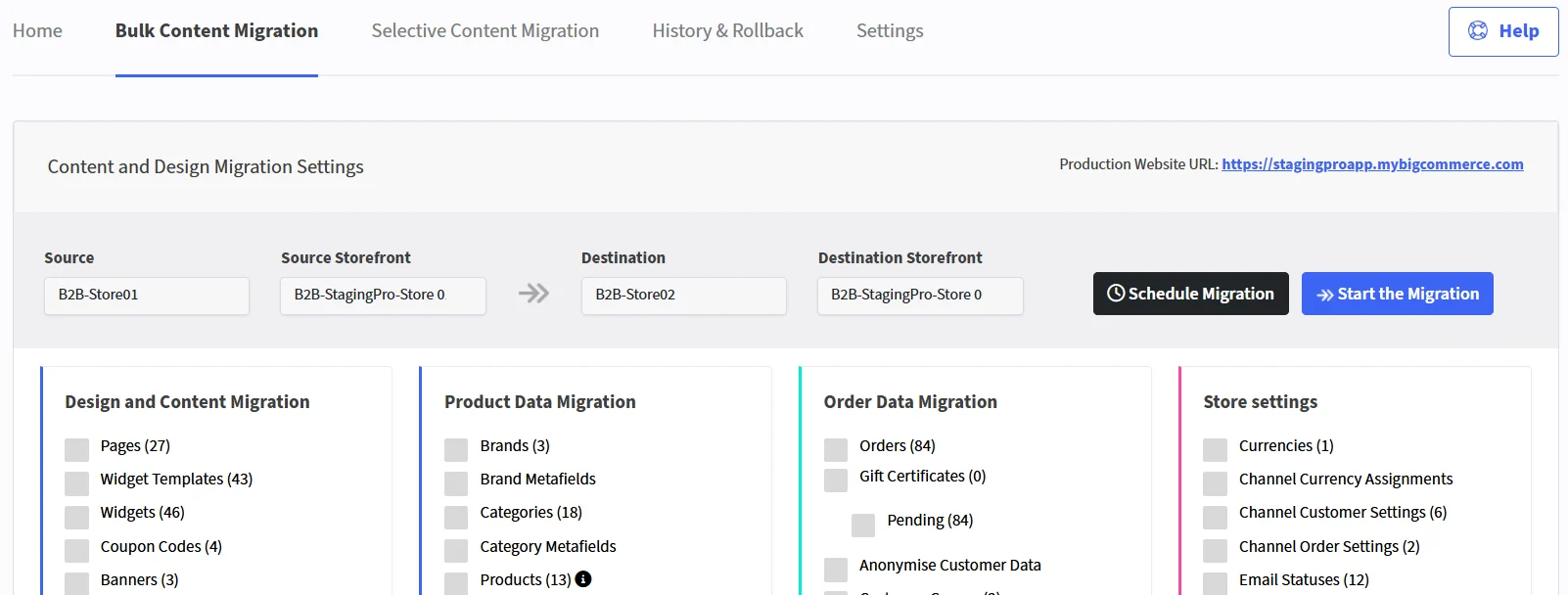
- New B2B Edition panel on Bulk Content Migration: Roles & Permissions, Companies (status, payment configuration, hierarchy, price-list links), Company Addresses, Company Users, Super Admins, and Sales Staff Assignments.
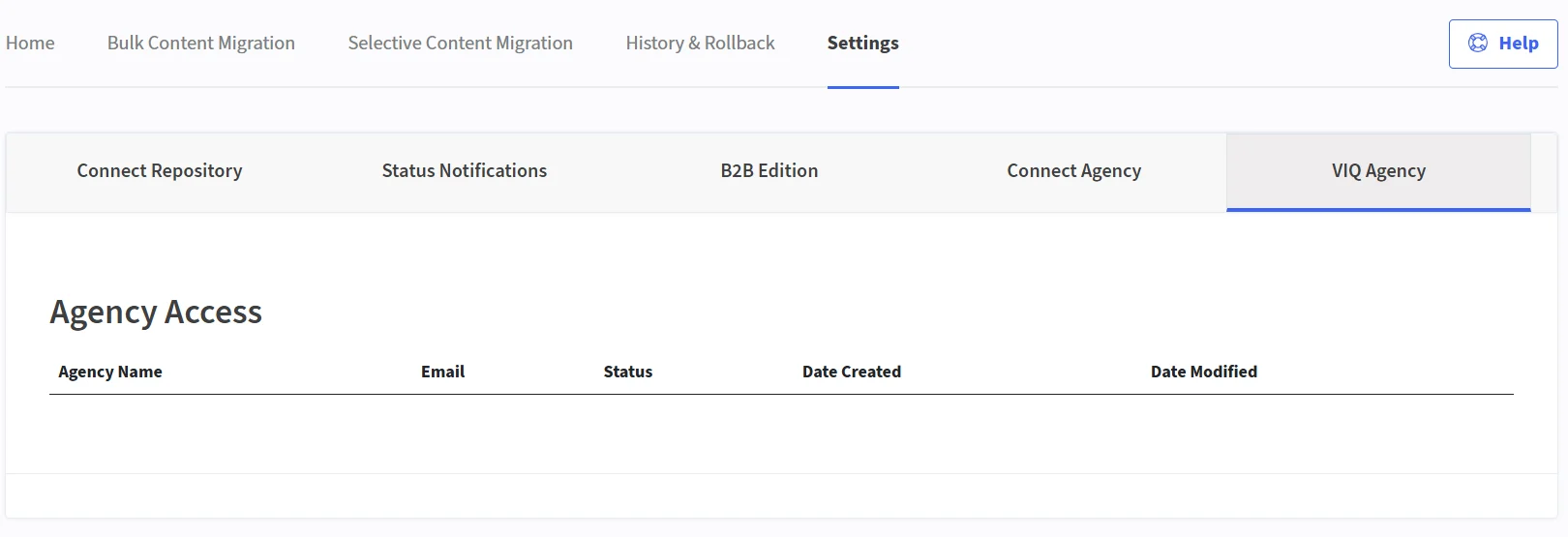
- No separate B2B credentials — the store’s main API token (created with the B2B Edition scope) does everything; the Settings → B2B Edition tab is obsolete.
- Company personal data is covered by the shared Anonymise Customer Data switch; anonymised identity is stable across re-runs, so repeats never duplicate.
- Advanced Filters panel on Products and Categories: category checkbox tree, visibility/availability/featured filters, “Modified on or after”, and a “Not on any storefront” product finder with a batch-scan flow.
- Categories and Custom Pages (renamed from “Pages”) render hierarchically with hierarchy-aware selection: picking a child picks its ancestors; unpicking a parent clears its descendants.
- Published the Theme Migration guide: themes copied byte-for-byte as new copies, never deleted; only design settings adjusted so your live look carries over.
- Migration History fully paginated (10/25/50/100 per page) — no more 100-row cap.
- Add New Only protection extended to price lists, customer groups, and customers: nothing that exists is ever rewritten.
- Products matched by SKU first, then name — editing a SKU no longer creates a duplicate.
- Add New Only guarantee: an existing item, and everything belonging to it, is never modified (matched pages are the one deliberate exception — always refreshed).
- The “destination holds more than 100 products” block on Add New Only removed: populated destinations migrate normally on any strategy.
- Run detail gains per-storefront theme-activation chips (activation verified by read-back) and a Page Templates section.
- Selective product, category, and page migrations now scope correctly to only what you selected, including the necessary parent/category hierarchy, instead of pulling in unrelated parts of the catalogue.
- Picking an item now migrates all of its sub-components by default (variant metafields, category metafields, page widgets, promotion customer groups), matching a full migration of that item.
- Fixed a data-safety issue where a selective migration on the Replace strategy could delete destination brands or categories that were outside your selection. That is no longer possible.
- Products now carry their full customs and identity fields (MPN, UPC, GTIN, warranty, condition, tax code, custom fields) to the destination.
- Migration history and detail screens now show clearer source/destination environment names, storefront names, and timing.
- A matched product (same SKU on both stores) can now be brought into an exact match of its source in a single run: options, variants, modifiers, complex rules, bulk pricing, custom fields, metafields, images and reviews are all reconciled, not just the top-level fields.
- The three migration strategies are now clearly defined. Skip adds only what is missing. Update brings a matched product’s children fully into sync without deleting other products. Replace does everything Update does, plus mirrors the destination catalogue exactly, and only runs on a full, non-selective migration. Live stock and availability are never touched by any strategy.
- The migration report now shows exactly what was Updated, Matched, and Deleted on every run, so the numbers always add up to the total.
- Verified in an independent audit: the source store is never written to, under any migration strategy. Confirmed with 12 out of 12 live products migrating as an exact replica in sandbox testing.
- Channel-specific (storefront-scoped) migrations now use BigCommerce’s own server-side filter instead of fetching the whole catalogue and filtering afterwards, making them faster.
- Every supported migration entity now has a self-healing retry, so a transient failure on one record no longer blocks the rest of the migration.
- Fixed five specific migration failures found in QA: gift certificates, promotions with an emptied product list, orders with historical product options, pages edited between types, and page widgets pointing at templates no longer on the destination.
- The conflict-strategy panel in the migration UI now explains exactly what Skip, Update, and Replace each do, instead of a single generic note.
- Installing StagingPro on BigCommerce now follows the same setup flow as Vortex Staging and Vortex Backup, for a consistent experience across every Vortex App.
- StagingPro now runs inside a single, unified app shell alongside RollbackPro, Vortex Staging and Vortex Backup, with a redesigned home, bulk migration, selective migration, themes, history and settings screens.
- Added an Image Manager for managing store images directly inside StagingPro.
- StagingPro now supports parent/child environment relationships, so a BigCommerce staging environment can automatically stay in sync with a connected Vortex Staging or Vortex Backup environment.
- StagingPro’s BigCommerce connector shipped, the first version of the app available directly from the Connections page.
- Migration of product custom template associations during product migration
- Migration of product page widgets, including image widgets and carousel image widgets
- Migration of page template layouts, including image widgets and carousel image widgets on the homepage
- Migration of product variants, categories (with automatic creation if they do not exist), and brands (with automatic creation if they do not exist)
Teams Notification Integration Update
- Login to Teams: Access Apps or the three dots (⋯) menu within Teams.
- Create Workflow: Navigate to Workflow, click New Workflow, and set up the workflow.
- New Workflow Functionality: Added a new function to manage the Teams workflow within StagingPro settings.
- Optimized Pages Tab: Removed redundant API calls, improving page load speed for selective content migration.
- Updated Welcome Email: Revised the welcome email template for clarity and alignment with user suggestions.
- Improved Storefront Dropdown: Fixed the dropdown to display only active storefronts related to BigCommerce.
- Connect Repository: Click on the “Connect Repository” tab under Settings and choose the option to connect with Bitbucket.
- Verify Repository: Verify the customer repository by entering the workspace/repository details.
- Add Team Member: Add a team member by entering the Bitbucket username and name.
- Create Developer Branch: Select the environment to create a developer branch.
- Change Permissions: Users can add or remove permissions for previously selected branches.
- Remove User: Deletes the user and associated branch information from the database.
- Pull/Commit Entry: After successfully committing changes or making pull requests in any developer branch, a new entry will appear under the History tab in the Code Deployment section.
- Generate Preview: Preview the changes before deployment.
- Approve & Deploy: Approve the changes and deploy them.
- Rollback: Rollback to a previous version if necessary..
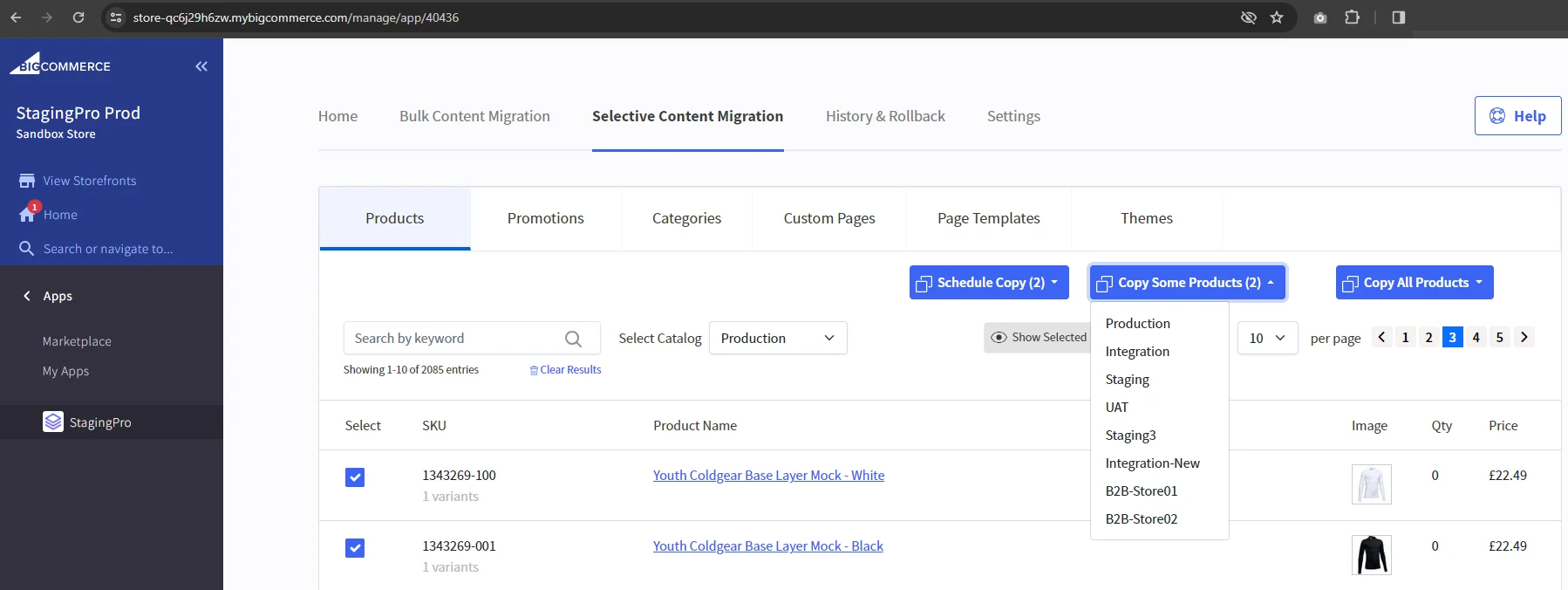
- Under Selective Migration > Products, selecting Products now shows the correct count for the ‘Copy Some Products’ button
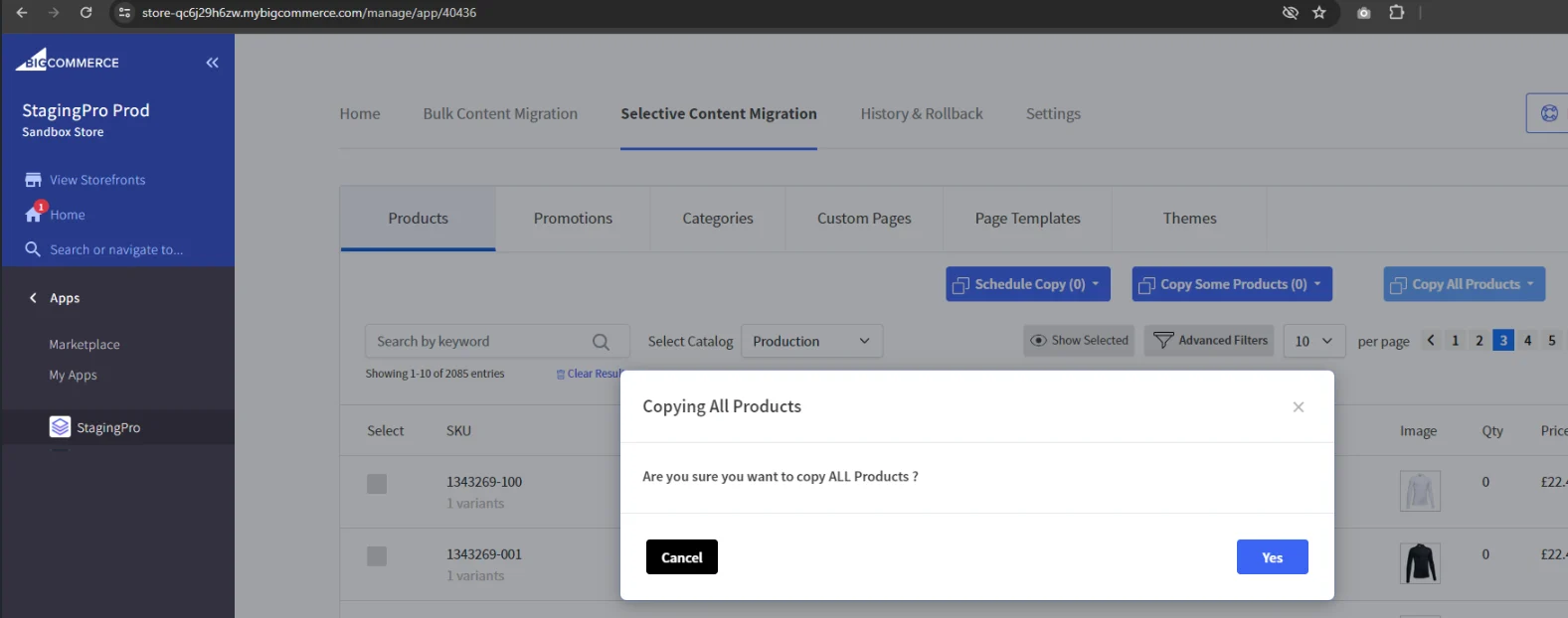
- Now clicking on the ‘Copy All Products’ button, you will get a popup notification which asks you to confirm if you are sure you want to copy ALL Products.
- In Selective Content Migration, only one email is sent regardless of number of entities selected for migration.
- Destination store details also sent in the migration initiated and completed emails.
- Store URL added under store name in home screen.
- Removed the count from the ‘Copy All Products’ button
- In Selective Content Migration, Custom Pages & Page Templates tabs added
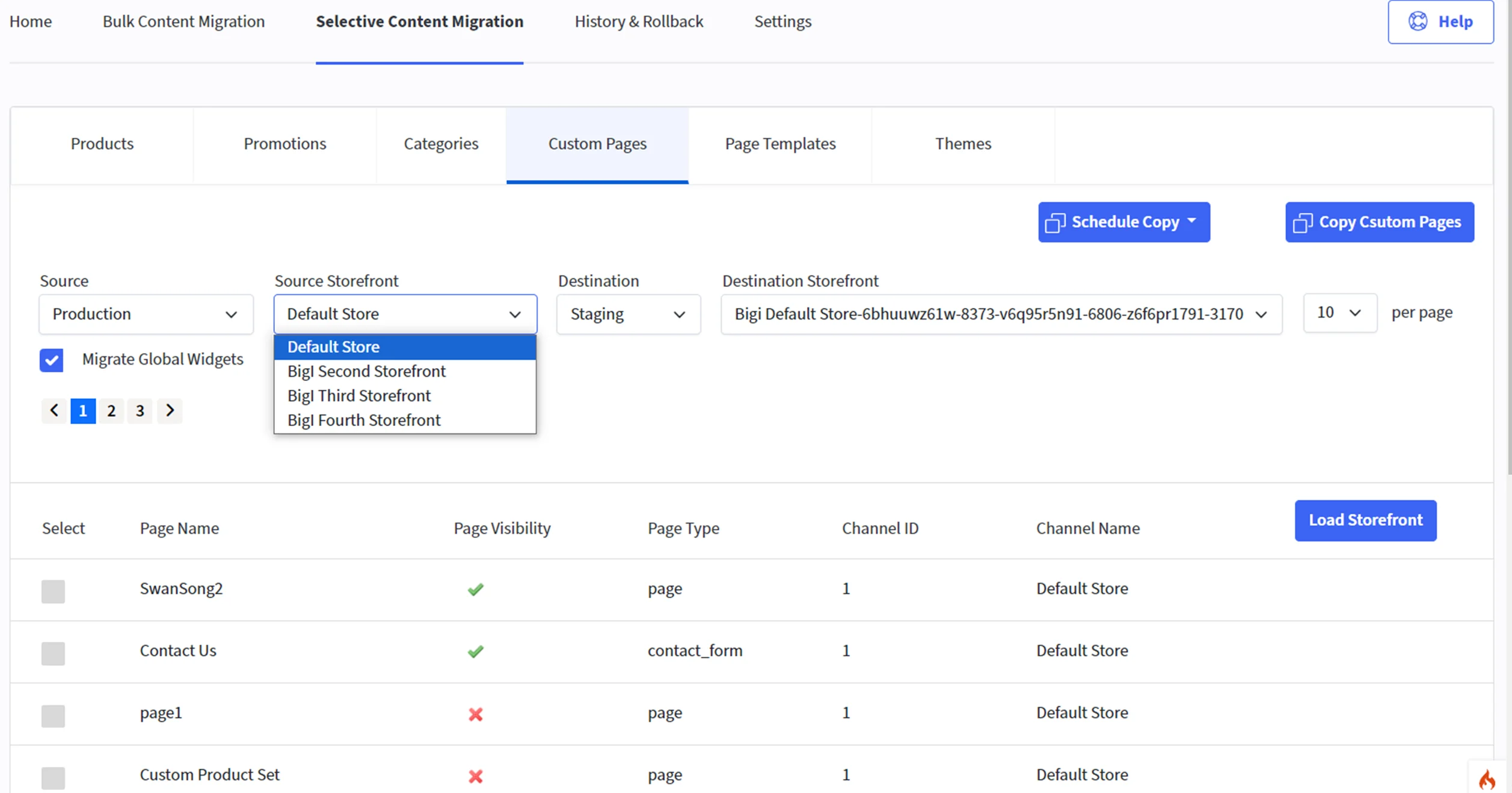
- Page names and corresponding URLs loaded in Page Templates
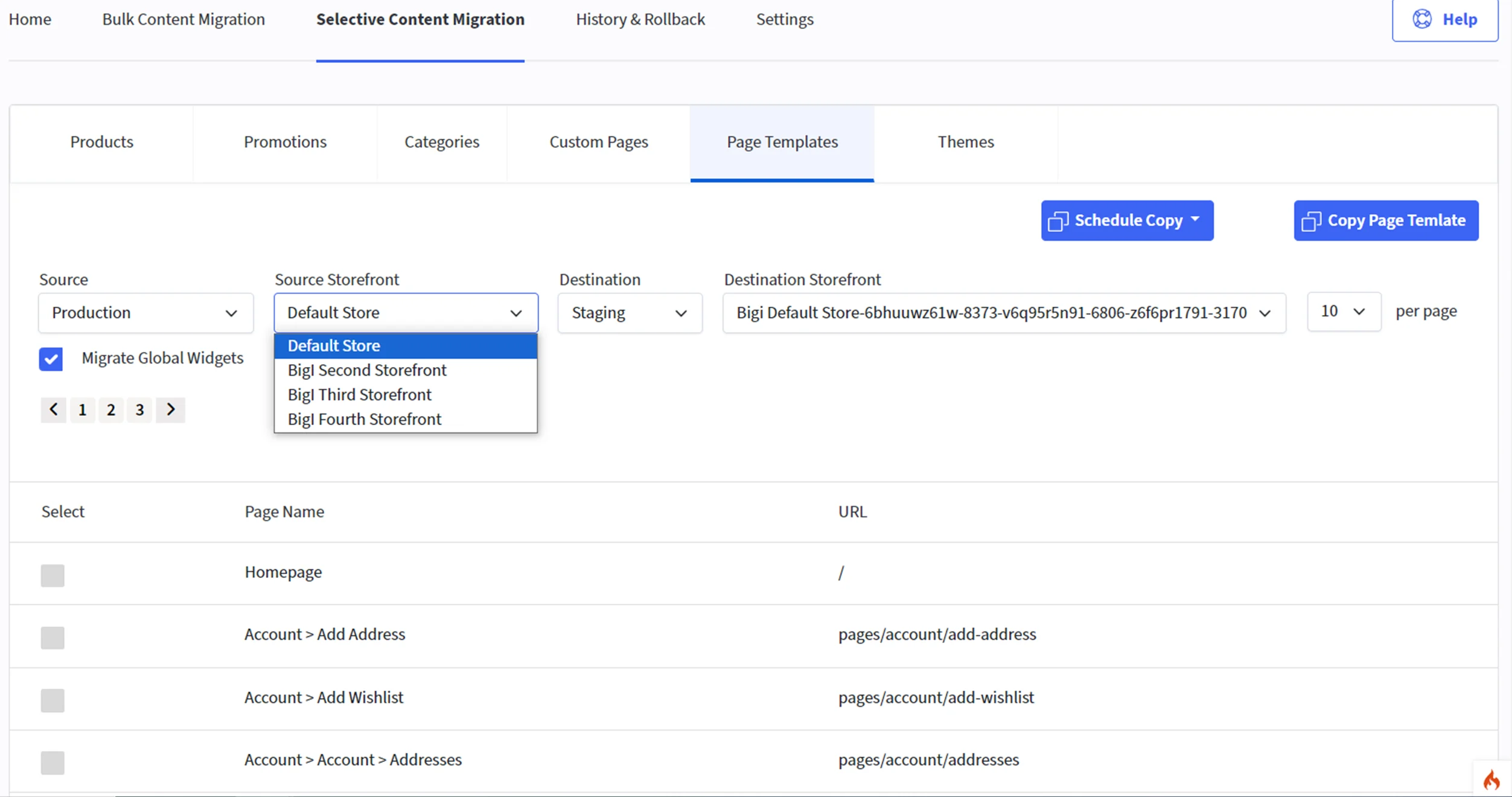
- Source and destination storefronts will be loaded into the dropdown list based on the selection of corresponding source and destination store
- “Migrate Global Widgets” checkbox added in Custom Pages & Page Templates tabs.
- At first time installation any store welcome screen will be loaded .
- Enter production store hash to create association between staging and production.
- **Uninstallation in production **store will disassociate all staging stores implies all the list of environments in home page will be lost and welcome screen will be displayed for all the production as well as staging stores.
- **Uninstallation in staging store, **only particular staging store will be uninstalled and will display welcome screen.
- Selective Content Migration default values displayed on the loading of the page - ‘production’ for store and the corresponding default storefront.
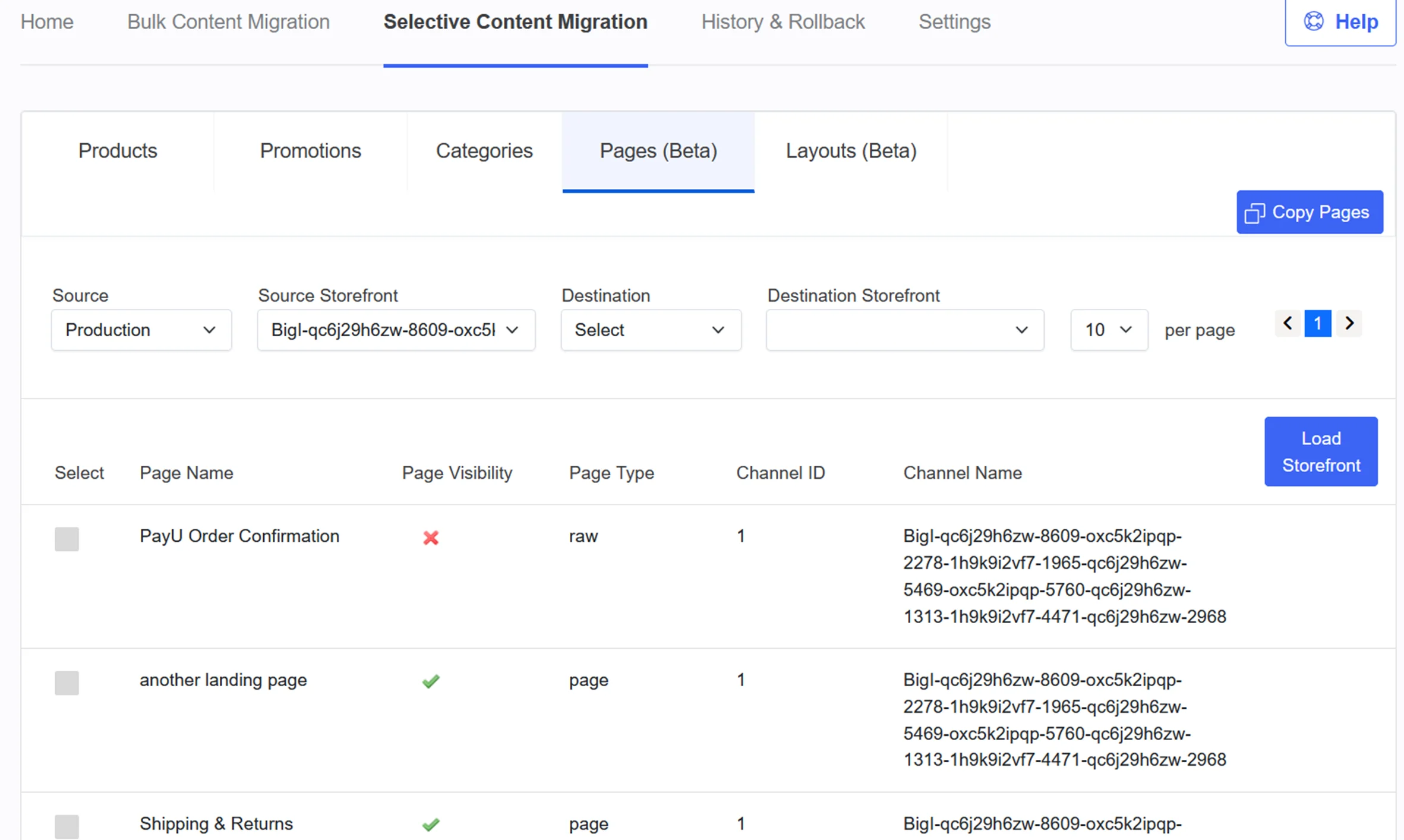
- The list of pages displayed are of the default storefront of the default store i.e., production.
- The list of pages data grid included the to display - Channel Name, Page Visibility (as tick mark) and Page Type
- For channel migration, Selective Content Migration now supports display of drop down selections for:
- All the source stores and corresponding source storefronts
- All the destination stores and corresponding storefronts

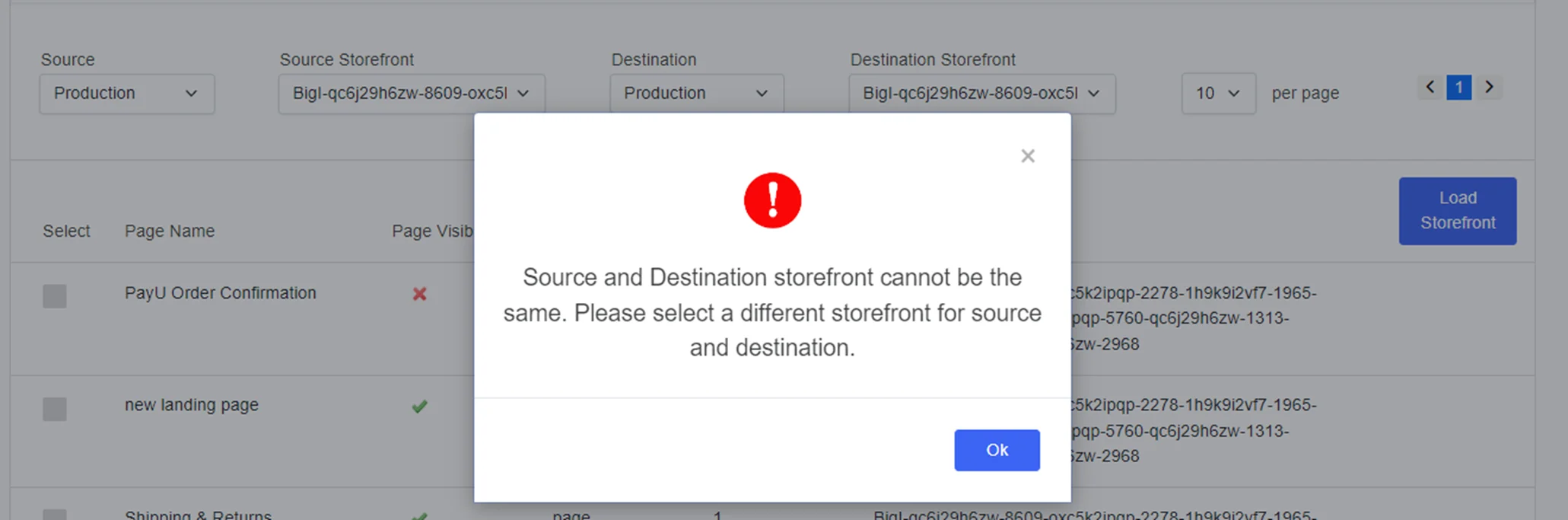
- Validation Message for page selection : “Please select the page(s) you want to create or update.”
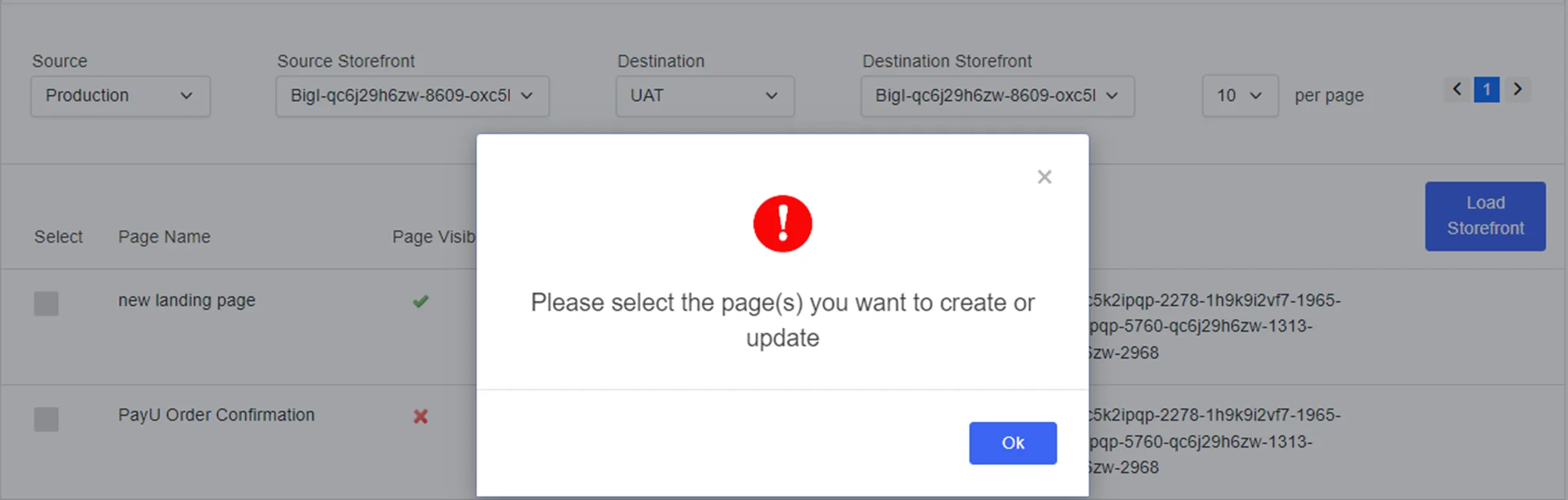
Release Notes 30-Oct-2023 Fix
- Applied fix to scheduled migration status tab that was not updating after completion of scheduled event.
- View details tab now opens under data migration tab if a migration has failed.
- Wrong message was showing after initiation of migration, it was showing migration completed for all entities and copy all products under Selective Content Migration.
- Migration status was directly updating to ‘Publish Completed’ right after migration initiated.
- Cron updated to reflect the latest status of migration of Selective Content Migration.
- Migration changes related to new entities in Selective Content Migration like page, layout and categories is implemented:
- In Home tab integrated the migration API for category, page, and layout.
- Migration was possible without selecting any category or layout entity and migration was failing.
- Migration for layout entity was displaying as page in History & Rollback.
- Page, Category and Layout header design correction.
- Promotion screen is not loading from category screen.
- When clicking on “advance filter” in product screen, other tabs were not displaying.
Release Notes 02-Oct-2023 New
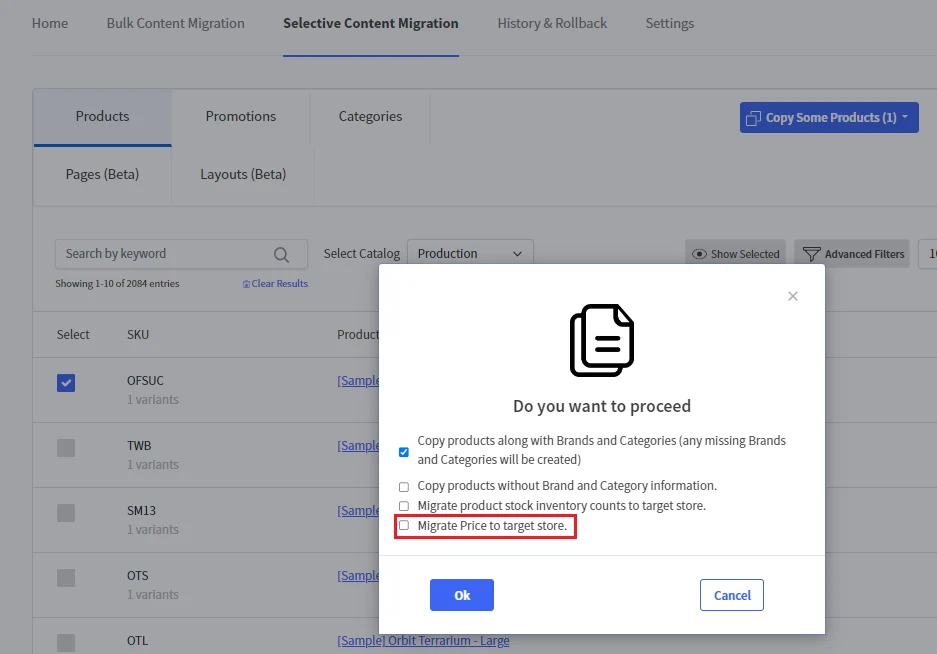
- Additionally, the default behaviour of Selective Migration of Products wont include product prices. So if you wish to migrate the product prices, please select the popup checkbox option ‘Migrate Price to target store’ prior to migration
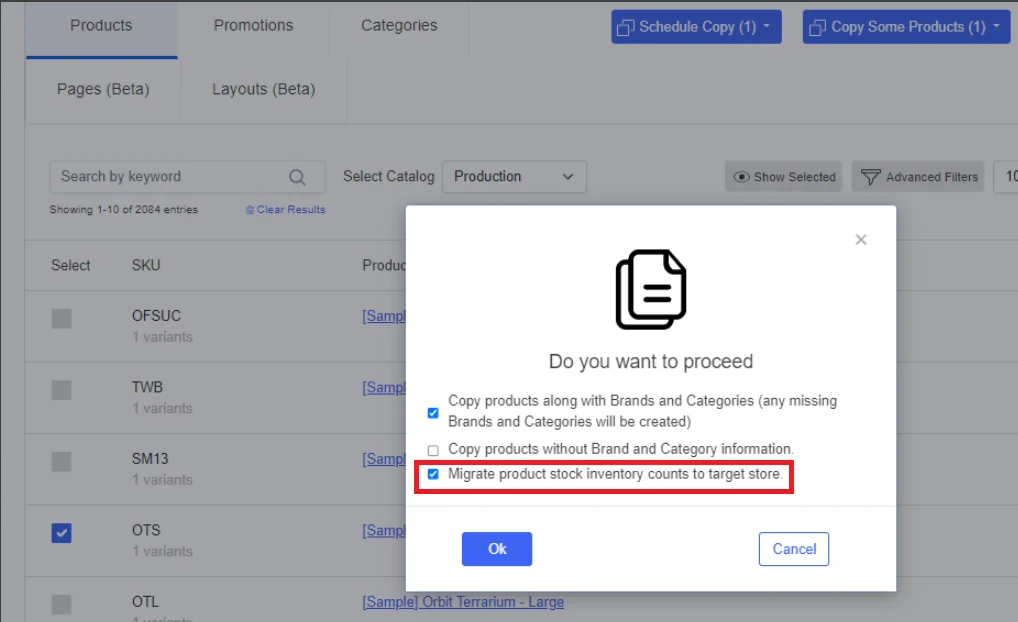
- Now the default behaviour of Selective Migration of Products wont include product inventory stock counts. If you wish to migrate the counts, please select the popup checkbox option ‘Migrate product stock inventory counts to target store’ prior to migration
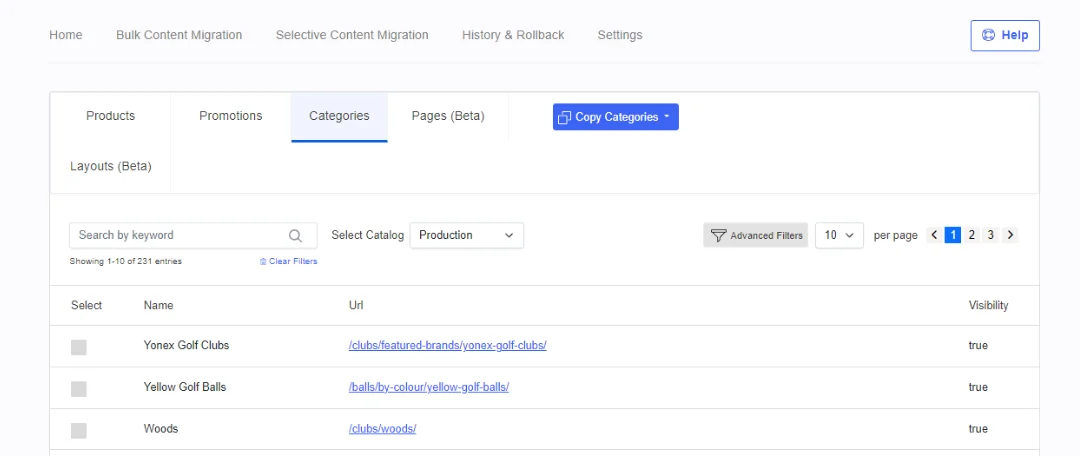
- Selective Migration of Categories is now available for your use
- Selective Product Migration now features the ‘Copy All Products’ button, which means you can run a selective update on all products now

- Promotion coupon codes migration now supported for bulk and selective migration.
- Selective Migration for Products now migrates Product Metafields and Product Reviews along with the products.
- Fix applied for migrating product variants in batches for successful migrations (Bulk and Selective)
- Selective Migration is now available for Content Migration: Pages and Layouts (Beta)Pages and Layouts
- Users can select the corresponding NodeJs version to deploy or generate a preview of the store.
- Users can cancel a deployment if it is stuck for any reason.
- Users can view the logs for all successful, rejected by user and failed deployments.
- The temporary preview server will automatically terminate once the deployment is completed.
- StagingPro will support NodeJs versions from 14 to 18.
- The deployment and preview generation process is now 40% faster and mostly under 3 minutes to complete.
- Logs generated during deployment can be viewed even if they contain special / junk characters.
- Users can test their theme with different NodeJs versions by generating a preview without affecting the Production environment.
- StagingPro Channel Assignment and Updates. User interface updates to group Storefronts and Channels on the Content Migration screen. STAG-266.
- Channel movements popup changes to show mapped storefronts and channels. STAG-276 and STAG-359.
- Bundle B2B Settings screen. STAG-362
- Bundle B2B Content Migration screen. STAG-363
- Bundle B2B migration status reflection on the ‘Home’ tab and ‘History & Rollback > Data Migrations’ tab STAG-364
- Promotions for ‘Selective Content Migration’ STAG-368
- Improve the logging system in all screens related to migration(content, product, history). STAG-384
- Rename ‘Store Coupons’ to ‘Coupon Codes’STAG-387
- Change in code flow for scheduled migration and listing schedule migration under the content migration tab. STAG-389
- Individual Theme migration from Source to Destination - Design, API. STAG-399
- Send out an onboarding email once a user installs the StagingPro app. STAG-400
- Updated API for StagingPro Migration History Log. STAG-401
- Individual Theme migration from Source to Destination, including inactive themes - Backend apps development. STAG-404
- Integration of Schedule for Selective Promotion functionality under product catalog screen. STAG-406
- Listing of migrated promotion data in History Screen under the data migration tab and Home screen. STAG-407
- Updates for Cross-Domain Scripts Included. STAG-409
- End-to-end regression testing for release v2.04. STAG-414
- Remove unrequired hyperlinks from add Staging popup. STAG-402
- CVSS 8.5 - Stored Cross-Site Scripting fixes.
- CVSS 8.1 - Reflected Cross-Site Scripting fixes
- CVSS 6.1 - jQuery-UI version upgraded to 1.13.2.
- CVSS 4.7 - Updated Security Headers.
- CVSS 4.3 - Added TLS Cookie (session) Secure Flags.
- CVSS 3.7 - Enhanced Insecure TLS/SSL Configurations.
- CVSS 3.0 - Included Cross-Domain Scripts.
- Support for Direct code committed to any of the connected environments.
- Generated preview will be based on committed code in the environment Git branch.
- ‘Approve & deploy’ action will deploy the codebase from committed code in the environment Git branch.
- Generate pull requests from one environment to another.
- Generated preview will be based on pull requests code in the environment Git branch.
- ‘Approve & deploy’ action will deploy the codebase from pull requests code in the environment Git branch.
- Schedule content migration. [STAG-306]
- When a new Staging Environment is added, and Production data is moved, the first-time migration data was not appearing on History and rollback and also on the homepage as it is not manually triggered from the User Interface. This has now been added to show the migration data on all interfaces. [STAG-371]
- Optimized to handle multiple deployments at the same time.
- Update all exceptions and show them on Frontend.
- When products are moved between environments, do not show the option to delete from PROD. This will help avoid any accidental deletion of the product catalog from the Production store. [STAG-336]
- Added guest token in product URL on click to view details under history and home screen. [STAG-343]
- Code Optimization and refactoring on the StagingPro frontend app. [STAG-346]
- Staging count logic Implementation to restrict the screen visibility as per the user plan and move the staging count value in the configuration file. [STAG-377]
- Channel Assignment and Channel [STAG-276] Movement popups
- Set the “Default” Source Environment option as ‘Please Select’ on the content migration page. [STAG-301]
- Implemented partner plan level information before sending approval of production requests. [STAG-296]
- Internal documentation for flow diagrams for all controllers and helpers. [STAG-345]
- Minutes and Hours issue in the view errors popup was fixed
- Show pop with inactive themes and add functionality to delete the inactive themes. This is done so that a user can delete old themes to add new ones from the user interface when it exceeds 20 themes within a store [STAG-262]
- Change permission for Git users’ on the setting screen. [STAG-342]
- Content Migration pre-load. [STAG-366]
- [STAG-367]
- Fixed issue where migration task status was ‘Completed,’ but the progress bar wasn’t updated
- Updated the field label for SKU.
- Fixed a bug where the SKU display value was missing.
- Checkbox should be disabled in content migration while initiating the migration.
- When we cancel on the add team member page, it should refresh automatically to remove old data.
- Improve the logging system in all screens related to migration(content, product, history)
- Under change permission, remove checkbox permission is not working.